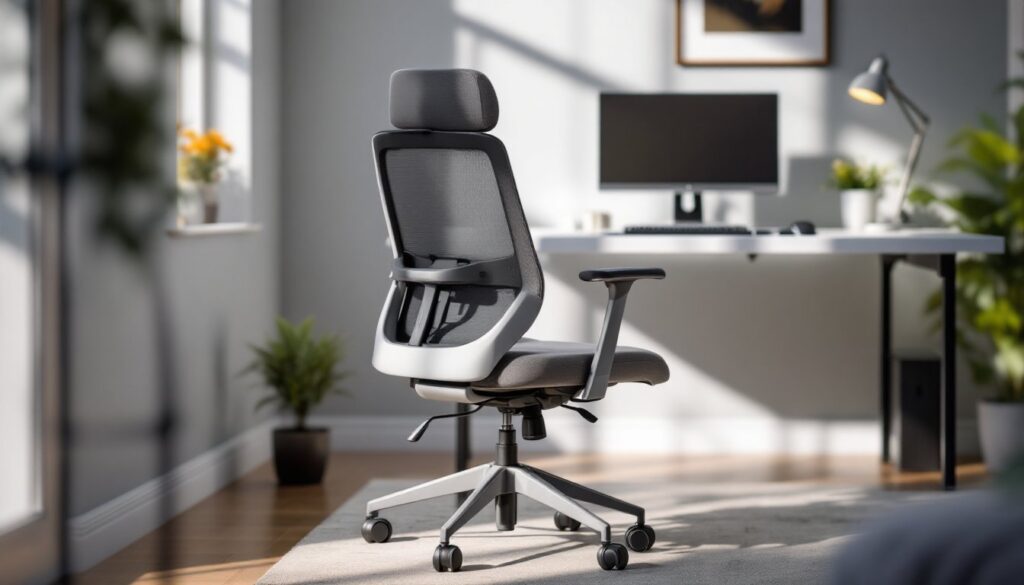

Your home office chair isn’t just furniture, it’s where you spend eight or more hours a day, and the wrong one will make your back, neck, and shoulders pay the price. A quality office swivel chair combines ergonomic design with durability and style, transforming your workspace from uncomfortable to genuinely functional. Whether you’re upgrading from a kitchen chair or replacing a worn-out model, choosing the right swivel chair means understanding what your body needs, what your budget can handle, and what materials will actually last. This guide walks you through the essentials so you can sit down to work feeling supported and confident.
Key Takeaways
- An ergonomic office swivel chair with proper lumbar support, adjustable height, and armrests prevents chronic back pain, poor posture, and repetitive strain injuries from long workdays.
- Budget should match daily use: full-time remote workers benefit from mid-range to premium chairs ($300–$700+), while occasional users can find solid options in the $200–$400 range with adjustable height and basic lumbar support.
- Mesh, fabric, and leather each offer different benefits—mesh breathes well and costs less, fabric provides cushioning and comfort, and leather delivers durability and a professional look—so choose based on your climate and aesthetic needs.
- Proper chair setup takes just five minutes but makes a huge difference: seat height at 90-degree knees, lumbar support at your belt line, armrests at elbow height, and monitor arm’s length away prevents discomfort before it starts.
- Regular maintenance including weekly vacuuming, caster inspection, and annual bolt checks can extend an office swivel chair’s lifespan to 5–7 years or longer, making your initial investment worthwhile.
Understanding Office Swivel Chair Ergonomics and Why It Matters
Sitting in a poorly designed chair for hours compounds over weeks and months, leading to chronic back pain, poor posture, and reduced productivity. A properly ergonomic office swivel chair distributes your weight evenly, supports the natural curve of your spine, and allows you to adjust positioning as you shift throughout the day.
Ergonomics isn’t just comfort, it’s injury prevention. When your chair forces you to hunch forward or crane your neck toward a monitor, you’re creating repetitive strain that can take years to recover from. The best chairs give you the tools to sit correctly without thinking about it.
Key Ergonomic Features to Look For
Lumbar support is non-negotiable. Your lower back has a natural inward curve (called lordosis), and a chair that doesn’t support it forces your spine into an unnatural position. Look for chairs with adjustable lumbar support or a curve built into the backrest that matches your spine’s shape. Some chairs offer lumbar support built-in: others have a pillow you can adjust up and down to find your sweet spot.
Seat height adjustment should be smooth and easy. Your feet should rest flat on the floor (or a footrest) with your knees at a 90-degree angle. If the seat is too high or too low, your legs and lower back take the strain. Most chairs use a pneumatic lever, the gas cylinder beneath the seat that you pump with a lever to raise or lower it.
Armrest height and width matter more than people realize. Your arms should rest comfortably, elbows at 90 degrees, without shrugging or reaching. Adjustable armrests that move up, down, and sometimes inward or outward give you the control to match your desk height and arm length. Fixed armrests are cheaper but less adaptable.
Seat depth and width should match your body. A seat that’s too deep pushes the edge into the back of your knees: one that’s too shallow doesn’t support your thighs properly. Most office chairs range from 17 to 21 inches deep. If you’re petite, narrower seats exist: larger frames benefit from wider seats and higher weight capacities.
Recline and tilt functions let you shift positions throughout the day. A recline mechanism lets you lean back without falling over, reducing pressure on your spine during phone calls or thinking time. A tilt lock keeps the chair from rolling when you’re stationary. Some chairs offer a “synchro-tilt” mechanism where the seat and backrest recline together, keeping your spine’s angle constant.
Swivel base and casters should move smoothly without requiring a death grip. A five-point base (five legs with casters) is the standard for stability. Casters should roll easily on your floor type, hardwood and tile need different caster materials than carpet.
What to Prioritize When Selecting a Swivel Chair for Your Budget
Budget ranges for office swivel chairs vary wildly: you can find basic models under $150, solid mid-range options between $300–$700, and premium ergonomic chairs hitting $1,200 or more. Where you should spend depends on how much time you spend sitting and what issues you’re trying to solve.
If you work from home full-time and sit for 8+ hours daily, invest in mid-range or better. Cheap chairs skimp on lumbar support, use flimsy materials, and often fail within a couple of years. The cost-per-hour of use drops significantly if a $500 chair lasts five years versus a $150 chair lasting eighteen months. A reputable brand with reviews from actual users will save you from buyer’s remorse.
For part-time or occasional use, a basic but solidly-built chair in the $200–$400 range often suffices. Look for models with adjustable height, basic lumbar support, and durable fabric. You don’t need all the bells and whistles if you’re not in the chair all day.
Key budget considerations:
- Material cost: Mesh costs less than high-end upholstery but requires different care.
- Brand reputation: Established furniture companies usually stand behind warranties and replacement parts.
- Warranty length: 5-year warranties suggest the maker believes in durability: 1-year warranties are red flags.
- Adjustability: More adjustment points cost more but let you dial in comfort precisely.
- Weight capacity: A chair rated for 250 lbs. won’t perform as well if you’re heavier: check this before buying.
Don’t equate price with comfort. Test before buying if possible, office furniture showrooms, local retailers, and some online sellers offer return windows. Your body’s needs are individual: what works for your colleague might feel wrong for you.
Materials, Durability, and Style Considerations for Home Offices
The material of your chair affects comfort, durability, maintenance, and how it looks in your space. Mesh, fabric, and leather (or leather-like) are the main options, each with trade-offs.
Mesh is breathable and cool, great if your office gets warm or you tend to get clammy sitting down. It’s also easier to clean (just wipe it down) and generally cheaper. Downsides: mesh can sag over time, it shows dust and pet hair easily, and it offers less cushioning than padded fabric. Mesh works well in modern or minimalist spaces and casual offices.
Fabric upholstery (usually polyester blends) offers cushioning and warmth. It’s softer underside and hides dust better than mesh. The downside is it stains more easily and requires more maintenance, vacuuming or spot-cleaning when spills happen. Fabric chairs often feel more “office-classic” and work in traditional or eclectic spaces. Check fabric density and stitch quality: cheap fabric frays and pils easily.
Leather or faux leather is durable, easy to wipe clean, and looks professional. Real leather is expensive and requires conditioning: faux leather is cheaper and lower-maintenance but can crack over time if the adhesive breaks down. Leather doesn’t breathe as well as mesh or fabric, so it can feel warm in summer. It works well in formal or executive-style offices.
When evaluating any material, check the base and casters. A five-star base in durable nylon or metal outlasts a flimsy plastic one. High-quality casters with ball bearings roll smoothly and last longer than cheap ones that squeak and stick.
Style matters too. Your chair should complement your office aesthetic. Modern minimalist spaces pair well with mesh or light-colored task chairs. Traditional offices can handle leather or dark upholstery. Contemporary design sources like Dwell and Elle Decor showcase how seating choices reflect overall design intent. If you’re uncertain about style direction, browse Houzz office chairs to see how different materials and colors work in real home offices.
Durability checklist:
- Gas cylinder rated for at least 100,000 cycles (roughly 5 years of daily use).
- Metal or reinforced plastic base (no thin, hollow plastic).
- Stitching that’s even and tight, not loose or puckered.
- Warranty covering mechanical parts (cylinder, tilt mechanism) for at least 3 years.
Setting Up Your Office Swivel Chair for Maximum Comfort
A great chair means nothing if you set it up wrong. Proper positioning takes five minutes but pays off immediately.
Height setup: Sit in the chair with your feet flat on the floor. Your thighs should be parallel to the ground or angled slightly downward. If your feet dangle, use a footrest (a simple wooden block works). Your desk should be at a height where your elbows rest at 90 degrees when your arms are at your sides and your hands are on the keyboard.
Lumbar support adjustment: If your chair has adjustable lumbar support, slide it up or down until it contacts the small of your back (around your belt line). It should feel supportive without digging in. If your chair has a removable lumbar pillow, experiment with positioning it an inch higher or lower until back pain improves.
Armrest positioning: Adjust armrests so your arms rest comfortably without you shrugging or reaching. If armrests are too high, remove them if possible, it’s better to have none than ones that force poor shoulder posture. Make sure armrests don’t hit your desk or block your movement.
Monitor and keyboard placement: Your monitor should be arm’s length away (roughly 20–26 inches) with the top of the screen at or slightly below eye level. This prevents neck strain that no chair can fix. Your keyboard and mouse should be close enough that you’re not reaching.
Recline setting: Adjust the recline tension so the chair feels stable when you lean back slightly but doesn’t lock solid. You want some give, completely rigid recline is uncomfortable during long stretches. If your chair has a tilt lock, use it when you’re stationary to prevent rolling.
Give yourself a week of adjusted seating before deciding if the chair truly fits. Your body adapts, and initial awkwardness often resolves as you dial in final tweaks.
Maintenance Tips to Extend Your Chair’s Lifespan
A well-maintained office swivel chair can easily last 5–7 years or longer. Neglect leads to premature failure and discomfort.
Regular cleaning prevents dust and dirt from getting into mechanisms. Vacuum mesh or fabric weekly using an upholstery brush attachment. For leather or faux leather, wipe with a slightly damp cloth. Never use harsh chemicals that can damage material or adhesives. Spot-clean spills immediately with a mild soap and water solution.
Caster care keeps your chair rolling smoothly. Inspect casters monthly for hair and lint wrapped around the wheels, pull it out by hand. If casters start sticking or squeaking, a light silicone spray (not WD-40, which attracts dirt) helps. Damaged casters can be replaced individually: most hardware stores and online retailers sell replacement sets.
Gas cylinder maintenance: The pneumatic cylinder under your seat does all the heavy lifting. If it stops holding your height adjustment, the seal has failed and the cylinder needs replacement. This is a common wear item and usually costs $30–$60 to replace. Don’t attempt to refill or repair it, replacement is the safe and proper fix.
Fabric and leather conditioning: Fabric upholstery doesn’t need much, but if your chair shows wear, a fabric protector spray (applied to clean, dry material) helps repel future stains. Leather benefits from occasional conditioning to prevent cracking, use a leather-specific conditioner, not furniture polish.
Bolt and fastener checks: Over time, vibration loosens bolts holding the base, armrests, and backrest. Once or twice a year, use an appropriate wrench to tighten any loose bolts. A loose base is a safety hazard.
Storage and environment: If you’re storing a chair temporarily, keep it in a dry place to prevent mold or rust on metal parts. Extreme temperature and humidity swings can cause material warping or adhesive failure, so avoid garages or unheated spaces for long periods.
Conclusion
Choosing an office swivel chair isn’t a minor decision, it’s an investment in your health, productivity, and comfort over years of use. Prioritize ergonomic features that support your spine, match your budget to the time you spend sitting, choose durable materials that fit your aesthetic, and take the time to set it up properly. A well-selected and maintained chair pays dividends every single workday. Start by assessing your needs and testing options whenever possible, and you’ll end up with a chair that feels less like furniture and more like part of your workspace.